The Ticketmaster Error Code U102 is a system message that appears when the platform blocks or interrupts a session during login, checkout, or ticket transfer. It is usually triggered by a temporary technical hiccup, a security check, or an account verification issue rather than a permanent block, and it typically clears once the session refreshes or the underlying cause is resolved.
This post explains what Ticketmaster Error Code U102 means, the most common reasons it shows up, and the practical steps that tend to resolve it. By the end, you will have a clear troubleshooting plan and a better sense of when it makes sense to reach out to Ticketmaster customer support directly.
What Is Ticketmaster Error Code U102?
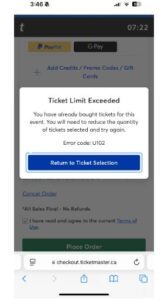
Ticketmaster Error Code U102 is a generic system error that surfaces across the platform’s website and mobile app. Users most commonly run into it during login attempts, checkout, payment processing, and occasionally ticket transfers. Ticketmaster has not published a detailed technical breakdown of every scenario that produces this code, so some explanations here are drawn from widely reported user experiences and general web application behaviour rather than confirmed internal documentation.
In most reported cases, the error is temporary and tied to the current session rather than a lasting account restriction. Refreshing the page, logging back in, or waiting a short period is often enough to clear it. That said, a smaller number of users report the error persisting across multiple attempts, which usually points to an account-level check or a connection issue rather than a one-off glitch.
The error can appear at almost any stage of the purchase journey: while signing in, while a queue is processing, during the final payment step, or when attempting to send tickets to another person. Because the underlying trigger can vary, the fix that works for one person may not work for another, which is why this guide covers a full range of troubleshooting options rather than a single quick tip. Know More Ticketmaster Error Code U103
Common Causes of Ticketmaster Error Code U102
A number of factors can contribute to this error appearing on your screen. Understanding the likely cause helps in picking the right fix faster.
-
Temporary Server Issues
Ticketmaster’s servers handle enormous traffic spikes during popular on-sales. A brief server-side hiccup can interrupt your session and trigger an error code, particularly in the opening minutes of a major ticket release.
-
Browser Cache or Cookies
Outdated or corrupted cache and cookie data can conflict with the site’s scripts, causing login or checkout screens to behave unpredictably.
-
VPN or Proxy Usage
Ticketmaster’s security systems are designed to flag unusual traffic patterns. Browsing through a VPN or proxy server can sometimes resemble suspicious activity to these systems, which may interrupt your session.
-
Multiple Rapid Purchase Attempts
Submitting several purchase attempts in quick succession, or opening the same event in multiple tabs, can confuse the checkout process and prompt a security check.
-
Suspicious Account Activity
Unusual sign-in patterns, such as logging in from an unfamiliar location or device, can trigger additional verification that interrupts the normal flow.
-
Network Connection Problems
An unstable Wi-Fi signal or a weak mobile data connection can drop packets mid-session, which the platform may interpret as an interrupted or invalid request.
-
Browser Compatibility Issues
Older browser versions, or browsers with heavy customisation from extensions, do not always render Ticketmaster’s checkout scripts correctly.
-
Security Verification Failures
CAPTCHA checks or two-factor prompts that time out or fail can produce an error rather than allowing the session to continue.
-
Session Timeout
Sessions that sit idle for too long, particularly while waiting in a virtual queue, can expire before checkout completes.
-
High-Demand Ticket Sales
During major on-sales, the sheer volume of simultaneous users increases the likelihood of any given session hitting a temporary snag.
-
Device-Specific Issues
Older devices, low storage space, or outdated operating systems can all affect how smoothly the Ticketmaster app or mobile site performs.
How to Fix Ticketmaster Error Code U102
Work through these steps roughly in order. Most users find the issue resolves within the first few attempts.
-
Refresh the Page
This works because a refresh clears a stuck script or a temporary loading glitch without losing your place in a queue. Press F5 or click the browser’s refresh icon, then wait for the page to fully reload. Expected outcome: the error message disappears and the page loads normally.
-
Log Out and Back In
This resets your session token, which can clear conflicts caused by an expired or corrupted login state. Sign out from your account menu, close the tab, reopen Ticketmaster, and sign back in. Expected outcome: a fresh session starts without the previous error.
-
Clear Browser Cache and Cookies
Removing stored data eliminates outdated files that may be clashing with the current version of the site. Open your browser settings, locate the privacy or history section, and clear cached images, files, and cookies for the last 24 hours. Expected outcome: the site loads with a clean slate, often resolving login and checkout glitches.
-
Try Incognito or Private Mode
Private browsing loads the site without existing cookies or extensions that could be interfering. Open a new incognito or private window and navigate to Ticketmaster directly. Expected outcome: a cleaner session that often bypasses the error entirely.
-
Update the Browser
Running an outdated browser version can cause compatibility problems with modern checkout scripts. Check for updates in your browser’s settings menu and install the latest version. Expected outcome: improved compatibility with Ticketmaster’s site.
-
Switch Browsers
A different browser can rule out issues specific to one piece of software. Try the purchase again using an alternative browser such as Chrome, Firefox, Safari, or Edge. Expected outcome: a working session in the new browser identifies the original browser as the source of the problem.
-
Use Another Device
Testing on a different device isolates hardware or local software issues. Attempt the same login or checkout process on a phone, tablet, or a different computer. Expected outcome: a working session on the alternative device points to a device-specific cause.
-
Disable VPN or Proxy
Turning off a VPN removes a common trigger for security checks. Close your VPN application or browser extension completely, then reload Ticketmaster. Expected outcome: a more stable connection that is less likely to be flagged.
-
Check Internet Stability
A consistent connection prevents dropped requests mid-session. Run a speed test, switch from Wi-Fi to a wired connection where possible, or move closer to your router. Expected outcome: fewer interruptions during checkout.
-
Wait Before Retrying
Giving the system a short break allows temporary server load or account flags to clear on their own. Pause for 10 to 15 minutes before attempting again. Expected outcome: the error may no longer appear on the next attempt.
-
Restart the Device
A restart clears background processes that could be interfering with the browser or app. Fully power off your device, wait a few seconds, and turn it back on. Expected outcome: a cleaner environment for your next attempt.
-
Update the Ticketmaster App
An outdated app version can contain bugs that newer releases have already fixed. Visit the App Store or Google Play, search for Ticketmaster, and install any available update. Expected outcome: a more stable app experience.
-
Reinstall the App
A full reinstall clears any corrupted app data that an update alone might not fix. Delete the Ticketmaster app, restart your device, then download it again from the official store. Expected outcome: a fresh installation free of prior glitches.
-
Check Ticketmaster Server Status
Confirming a wider outage saves time troubleshooting a problem on your end that is actually system-wide. Search for Ticketmaster status updates or check outage-tracking websites and official social media accounts. Expected outcome: confirmation of a wider outage, or evidence that the issue is isolated to your own connection.
-
Contact Ticketmaster Support
Direct support can investigate account-specific causes that general troubleshooting cannot fix. Reach out through the official Ticketmaster help centre and describe the exact error and the steps already tried. Expected outcome: a tailored resolution or an explanation specific to your account.
Is Ticketmaster Error Code U102 a Ban?
For the vast majority of users, this error does not signal a permanent account ban. It is generally a temporary interruption tied to a session, a security check, or a technical fault. Repeated triggering of security systems, such as attempting many rapid purchases in a short window, can occasionally lead to a temporary restriction rather than a permanent one. Users who see the error persist across several days, and across different devices and networks, may want to contact support to rule out an account-specific issue rather than continuing to attempt repeated purchases, which can sometimes prolong the restriction.
Does Ticketmaster Error Code U102 Affect Mobile Users?
Yes, the error can appear across Android devices, iPhones, mobile browsers, and the dedicated Ticketmaster app, not only on desktop.
- Android users often find that clearing the app’s cache through the phone’s settings menu, rather than reinstalling straight away, resolves the issue quickly.
- iPhone users benefit from checking for iOS updates alongside app updates, since compatibility issues sometimes stem from an outdated operating system rather than the app itself.
- Mobile browser users should try switching between the mobile site and the dedicated app, since one may perform more reliably than the other depending on the device.
- App users experiencing repeated errors should confirm they have a stable connection, since mobile data fluctuations are a common contributor on the go.
When Should You Contact Ticketmaster Support?
Reaching out to support becomes worthwhile in specific situations rather than after every single occurrence of the error.
- The error persists across multiple browsers, devices, and networks after trying the steps above.
- A purchase fails repeatedly despite valid payment details and a stable connection.
- Your card has been charged, yet no confirmation email or ticket appears in your account.
- Tickets do not arrive within the expected delivery window after a successful purchase.
- You are locked out of your account entirely and cannot complete standard password recovery steps.
Troubleshooting Checklist
Use this quick-reference table to match your situation with the recommended first step.
| Problem | Recommended Solution |
| Error appears at login | Log out fully, clear cookies, and sign back in |
| Error appears during checkout | Refresh the page, then retry with a wired connection |
| Error appears during ticket transfer | Log out and back in, then retry the transfer |
| Using a VPN or proxy | Disable it completely before reloading the site |
| Error persists in one browser only | Switch to an alternative browser or use private mode |
| Error appears on the mobile app | Update or reinstall the Ticketmaster app |
| Error appears on mobile browser | Try the dedicated app instead of the browser |
| Error appears during a major on-sale | Wait 10–15 minutes, then retry once traffic eases |
| Charged but no confirmation received | Contact Ticketmaster support directly |
| Error persists across devices and networks | Contact Ticketmaster support for account-specific help |
Common Mistakes Users Make
Certain habits make Ticketmaster Error Code U102 more likely to appear or harder to resolve.
- Constantly refreshing the page during a queue or checkout, which can restart the session unnecessarily.
- Using multiple devices or browser tabs at the same time for the same account.
- Browsing through a VPN or proxy during checkout without realising it may trigger a security check.
- Ignoring browser update prompts for months at a time.
- Clearing cookies mid-checkout instead of before starting a new attempt.
- Switching payment methods repeatedly within a single session rather than confirming one card works first.
The Bottom Line
Ticketmaster Error Code U102 is an unwelcome interruption, but it is rarely a sign of a serious or permanent problem. In most cases, it stems from a temporary server issue, a browser or connection glitch, or a security check triggered by unusual activity such as VPN use or rapid repeat attempts. Working through the troubleshooting steps in this guide, starting with a refresh and login reset before moving on to cache clearing, browser switching, and device checks, resolves the issue for the majority of users. Persistent problems, especially those involving a charged card without a confirmed order, are worth escalating directly to Ticketmaster customer support. With a clear plan in hand, you can move past the error and get back to securing the tickets you actually want.
Frequently Asked Questions
What is Ticketmaster Error Code U102?
It is a system error that can appear during login, checkout, or ticket transfer, usually linked to a temporary technical or security issue rather than a permanent problem.
Why am I getting Error Code U102?
Common triggers include server load during busy on-sales, cache or cookie conflicts, VPN use, network instability, or a security check on your account.
Is Ticketmaster Error Code U102 permanent?
No, in most reported cases it clears after a refresh, a new login, or a short wait, and does not represent a lasting account issue.
Does clearing cache fix Error U102?
Clearing cache and cookies resolves the error for many users because it removes outdated data that may be conflicting with the current site.
Can VPN cause Ticketmaster Error U102?
Yes, a VPN or proxy can resemble suspicious traffic to Ticketmaster’s security systems, which may interrupt your session and produce this error.
Can I still buy tickets after Error U102?
Most users can complete a purchase after applying one or more of the troubleshooting steps above, such as refreshing, logging back in, or switching devices.
Does Error U102 affect ticket transfers?
Yes, the error has been reported during transfers as well as during login and checkout, and the same troubleshooting steps generally apply.
How long does Ticketmaster Error U102 last?
Duration varies, ranging from a few seconds after a refresh to a longer delay if the cause is server load during a major on-sale.
Can the Ticketmaster app cause Error U102?
An outdated or corrupted app installation can contribute to the error, and updating or reinstalling the app often resolves it.
Should I contact Ticketmaster support?
Contacting support makes sense once the standard troubleshooting steps have been tried without success, or when a payment has been charged without a corresponding order confirmation.
Does the error mean my account has been banned?
Rarely, and it usually indicates a temporary restriction or technical fault rather than a permanent ban.
Can too many login attempts cause this error?
Yes, several rapid login or purchase attempts in a short window can prompt additional security checks that interrupt the session.
Is Error U102 the same on desktop and mobile?
The underlying causes are similar across platforms, though mobile users should also check app updates and device storage as additional factors.
Does high ticket demand make Error U102 more likely?
Yes, error rates tend to rise during major on-sales because of the sheer volume of simultaneous users placing load on the system.
Will restarting my router help with Error U102?
A router restart can resolve connection instability, which is one of several factors that can contribute to this error appearing.
Some Related Ticketmaster Error
Ticketmaster error code 0007
Ticketmaster Error Code U307
Ticketmaster Error code U303
Error Code U215 Ticketmaster
Ticketmaster Error Code U505
Ticketmaster Error Code U534
Error Code U219 Ticketmaster
Ticketmaster Error Code U201
Ticketmaster Error Code U533
Ticketmaster Error Code U001