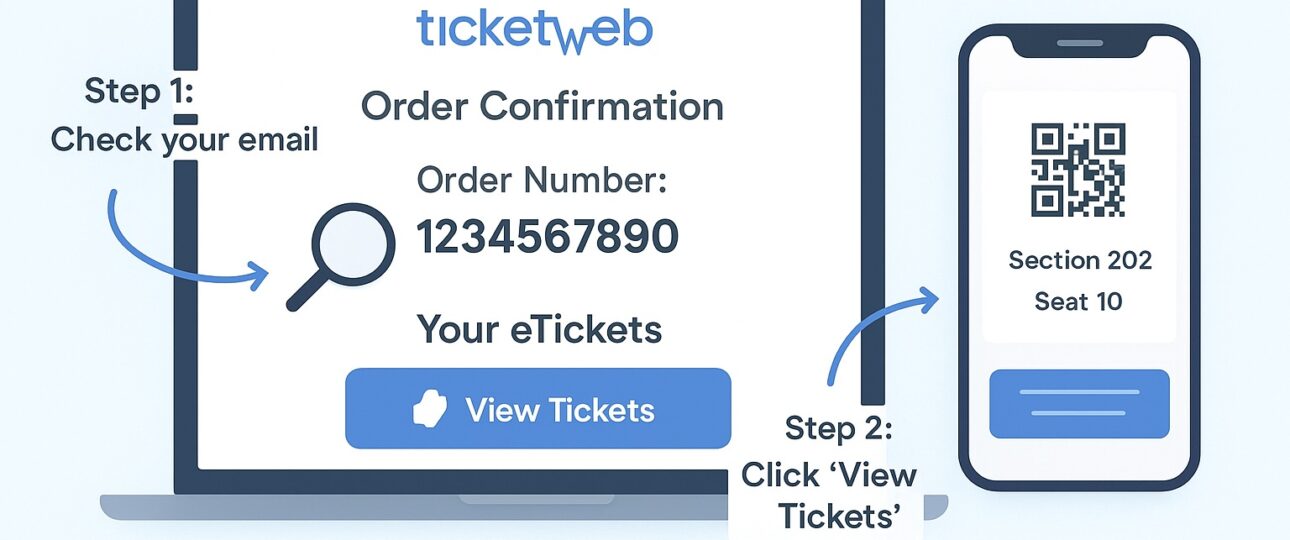
Buying tickets online for concerts, comedy shows, or festivals should be easy. Ticketweb is a trusted site used by many people in the USA and worldwide to book tickets for different events. Still, users often have questions about their Ticketweb order number, how to find eTickets, how to look up an order, and what steps to take if something goes wrong.
What Is a Ticketweb Order Number?
A Ticketweb order number is a special code you get when you buy tickets on Ticketweb. It’s like a secret ID just for your purchase. Every time you buy tickets for something like a concert, comedy show, or sports game, Ticketweb gives you a unique order number to keep track of your tickets.
This number is important because:
- It’s a proof you bought the tickets.
- It helps you find your tickets or check details about your event.
- You will need it if you talk to Ticketweb expert or representative for help.
- It makes sure everything about your order is organized and easy to find.
The order number works like a receipt for your purchase and helps you keep track of your tickets.
Why Does the Ticketweb Order Number Matter?
You might wonder why this Ticketweb order number matters. It’s important because:
- Track Your Order: The order number lets you check if your payment went through or if your tickets are ready.
- Get Your eTickets: If you bought digital tickets (eTickets), the order number helps you find them in your email or Ticketweb account.
- Talk to Support: If something goes wrong, like you can’t find your tickets, the order number helps Ticketweb expert team find your order fast.
- Stay Updated: If an event gets canceled or moved to a new date, Ticketweb uses your order number to send you updates.
- Prove Your Purchase: The order number shows you paid for the tickets, so it’s like your ticket to the event.
If you are in the USA, this number is extra handy because Ticketweb is super popular for events here, and you will need it to manage your tickets smoothly.
How to Find Your Ticketweb Order Number
Finding your Ticketweb order number is easy if you know where to look. Here are the main places to check:
-
Confirmation Screen
Right after you buy your tickets and click “Pay,” Ticketweb shows a confirmation screen. This screen will have your order number, usually something like TW123476589. Write it down or take a screenshot so you don’t forget it.
-
Confirmation Email
A few minutes after you buy tickets, Ticketweb sends you an email to the address you used at checkout. The email might have a subject line like “Your Ticketweb Tickets for Order #143556 Have Arrived!” Inside, you will find:
- Your Ticketweb order number.
- Details about the event (like the date, time, and venue).
- Your eTickets (either as a PDF attachment or a link to download them).
If you don’t see the email, check your spam, junk, or promotions folder. Sometimes emails get stuck there. You can also search your inbox for “Ticketweb” or “order number” to find it fast.
-
Ticketweb Account
If you made a Ticketweb account when you bought your tickets, you can log in to see your order number. Here’s how:
- Go to the Ticketweb website (www.Ticketweb.com for the USA).
- Click “Sign In” and use your email and password.
- Look for “My Tickets” or “Order History.”
- Find the event you bought tickets for, and your order number will be listed there.
-
eTicket or PDF Ticket
If you got eTickets, your order number might be on the ticket itself. Check the PDF file in your email or download it from your Ticketweb account. The order number is usually listed with the event details, like the date and barcode.
-
Payment Receipt
If you paid with a credit card or PayPal, check your bank statement or payment confirmation email. Sometimes the order number shows up in the transaction description, like “Ticketweb TW123476589.”
If you still can’t find your order number, don’t stress! You can contact at Ticketweb phone number, and they will help you track it down.
What Is a Ticketweb Order Number eTicket?
You might come across the phrase Ticketweb order number eTicket in your email or on the Ticketweb website. An eTicket is a digital ticket you can show on your phone or print out. Unlike old paper tickets that come in the mail, eTickets are sent to you right away through email or your Ticketweb account.
The Ticketweb order number eTicket just means the order number tied to your eTicket purchase. This number is your key to finding and downloading your eTickets. For example:
- Your confirmation email might have a link or a PDF file with your eTickets, and the order number will be in that email.
- You can log into your Ticketweb account, find your order number, and download your eTickets from there.
Note: Save your eTickets somewhere safe, like your phone’s wallet app or a folder, so you are ready for the event.
How to Search for Your Ticketweb Order Number
If you need to find your tickets or check your order details, the Ticketweb order number search is your friend. Ticketweb doesn’t have a specific search bar for order numbers, but you can still find your order easily. Here’s how:
-
Search Your Email
If you can’t find your confirmation email, use your email app’s search bar. Type in “Ticketweb,” “order number,” or “confirmation.” This should pull up the email with your order number and eTickets.
-
Use Your Ticketweb Account
Log into your Ticketweb account (on www.Ticketweb.com or the Ticketweb mobile app). Go to “My Tickets” or “Order History.” Your order number will be next to the event you bought tickets for. Click it to see your tickets and event details.
-
Check the Ticketweb Mobile App
Download the Ticketweb app from the App Store or Google Play. Log in with your email and password, then go to “My Tickets.” Your order number and eTickets are all there. The app is great because it works offline, so you can show your tickets at the event even without Wi-Fi.
-
Contact Customer Support
If you’re stuck, reach out to Ticketweb expert team. Go to the “Contact Us” or “Help” section on their website. Give them your email, event name, or payment details, and they will find your order number for you. Having the order number makes this process faster, but they can help even if you don’t have it.
-
Check the Event Page
If you know the event you bought tickets for, go to the event page on Ticketweb’s website. Log in, and you might be able to see your order details, including the order number, tied to that event.
Ticketweb Order Number in the USA
If you are looking up Ticketweb order number USA, you are likely purchasing tickets for an event in the United States. Ticketweb is widely used across the country for everything from local shows to major concerts. The steps to find and use your order number are the same everywhere, but here are a few points specific to USA events:
- Venue Rules: Some venues in the USA ask for your eTicket (with the order number) or a printed ticket at the door. Check the event details to be sure.
- Time Zones: The USA has multiple time zones, so double-check the event time in your order details to avoid mix-ups.
- Refunds: If you want a refund or need to exchange tickets, you will need your order number. USA events might have specific refund rules, so check the event page or contact support.
You can manage everything through www.Ticketweb.com, the USA version of the website, or the Ticketweb app.
What If You Can’t Find Your Order Number or eTickets?
If you have lost your confirmation email or can’t find your order number, don’t panic. Try these steps:
- Check Your Ticketweb Account: Log into www.Ticketweb.com or the app and go to “My Tickets.” Your order number and eTickets should be there.
- Reset Your Password: If you can’t log in, use the “Forgot Password” link to reset it.
- Wrong Email?: If you typed the wrong email when buying tickets, contact at Ticketweb phone number. Give them your name, event details, and proof of payment (like a bank statement), and they will fix it.
Wrapping It Up!
Your Ticketweb order number is your key to a smooth and fun event experience. Whether you’re going to a concert, show, or festival in the USA, this number helps you find your eTickets, check event details, and get help if you need it. Save your confirmation email, use the Ticketweb app or account, and keep your order number handy.
FAQs
- How do I find my Ticketweb order number?
- Check your confirmation email, Ticketweb account (“My Tickets”), or the eTicket itself. It’s usually a code like TW123765489.
- Where are my eTickets?
- Your eTickets are in:
- The confirmation email (as a PDF or link).
- Your Ticketweb account under “My Tickets.”
- The Ticketweb app under “My Tickets.”
- Your eTickets are in:
- Can I search for my order with my name or credit card?
- Ticketweb usually needs your order number, but support can look up your order with your name, email, or payment info if you don’t have it.
- Is the process different in the USA?
- Nope! The steps are the same. Use www.Ticketweb.com or the app to manage your orders and eTickets for USA events.