When you want tickets for a concert, sports game, or theater show, Seatgeek is often one of the first platforms people turn to. Many new users often ask, how does buying tickets on Seatgeek work, and what makes Seatgeek different from other platforms? With a wide range of events and features designed to simplify your search, it has become a go-to choice for fans everywhere.
How Does Buying Tickets on Seatgeek Work?

Buying tickets on Seatgeek is straightforward, even if you have never used the platform before. Here’s a step-by-step walkthrough to walk you through the process:
Step 1: Search for Your Event
The first thing you will do is find the event you want to attend. On the Seatgeek website or app, you can search for events by typing in the name of the artist, team, or show you are interested in.
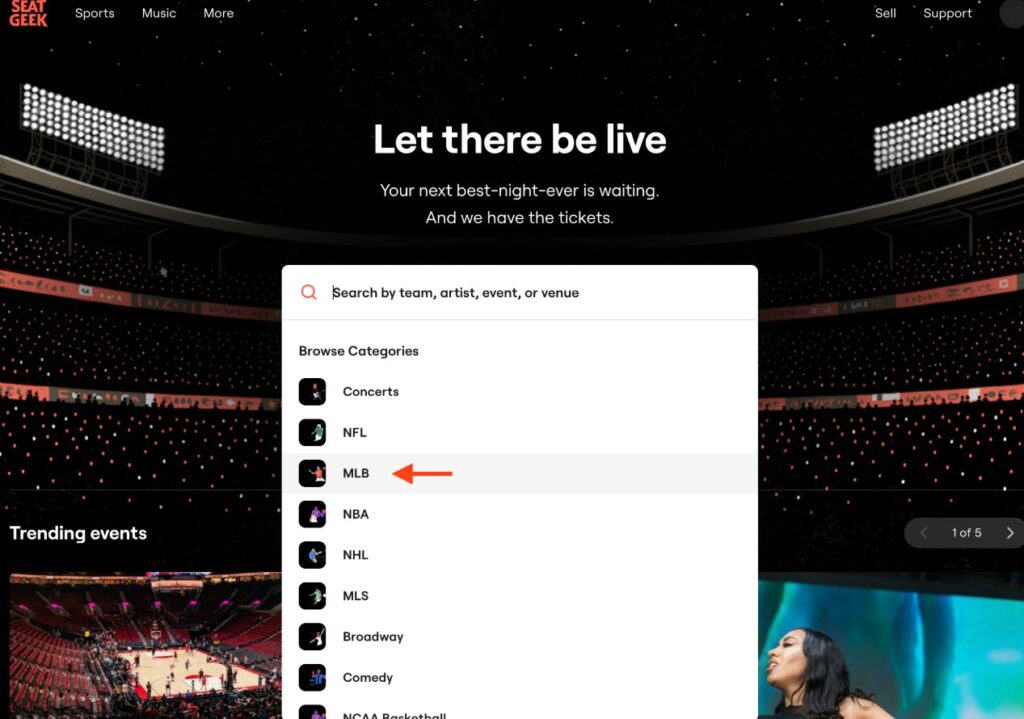
You can also browse by category (like concerts, sports, or theater) or filter by location to find events near you. Seatgeek will show you a list of upcoming events that match your search, along with dates, venues, and starting prices.
Step 2: Pick Your Tickets
Once you have found your event, Seatgeek will display all the available tickets. You will see a seating chart of the venue, which helps you visualize where the seats are located. The tickets are color-coded based on Seatgeek’s “Deal Score” system:
- Green means it’s a great deal (good value for the price).
- Yellow means it’s an average deal.
- Red means the tickets are pricier compared to others for the same event.

You can filter tickets by price, section, or other preferences (like aisle seats). Seatgeek also shows you the total price upfront, including fees, so there are no surprises at checkout.
Click on the tickets you like to select them. You will see details like the seat numbers, row, and section, along with any special notes.
Step 3: Check Out
After picking your tickets, you’ll head to the checkout page. Here, you will need to:
- Sign in to your Seatgeek account (or create one if you don’t have one yet).
- Enter your payment information. Seatgeek accepts credit cards, debit cards, and sometimes digital wallets like PayPal or Apple Pay, depending on your region.
- Confirm your delivery method. Most tickets on Seatgeek are electronic, so they’ll be sent to your email or stored in your Seatgeek account. Some events may offer physical tickets or mobile entry through apps like Ticketmaster or the venue’s app.
- Double-check the event details, seat selection, and price before finalizing your purchase. Once you confirm, Seatgeek will process your payment and send you a confirmation email.

Image instruction: Insert a screenshot of the Seatgeek checkout page showing event details, seat selection, and payment fields.
Step 4: Get Your Tickets
After buying, your tickets will be delivered based on the method you chose. For electronic tickets, you’ll usually get a QR code or barcode in your Seatgeek account or email. You can either show this on your phone at the venue or transfer it to the event’s ticketing app if required. If the tickets are in your Seatgeek account, you can access them anytime by logging in.

For some events, tickets might not be available immediately if the seller hasn’t transferred them yet. Seatgeek will keep you updated on the status and ensure you get your tickets before the event.
Step 5: Attend the Event
On the day of the event, bring your phone with the ticket’s QR code or barcode, or follow the venue’s instructions for entry. If you have any issues, Seatgeek’s customer support is available to help via email, phone, or chat.

That’s the basic process! Seatgeek makes it easy to compare prices, see where you will be sitting, and complete your purchase in just a few clicks. But what happens if you can’t make it to the event? That’s where Seatgeek’s returnable tickets feature comes in handy.
What Are Seatgeek Returnable Tickets?
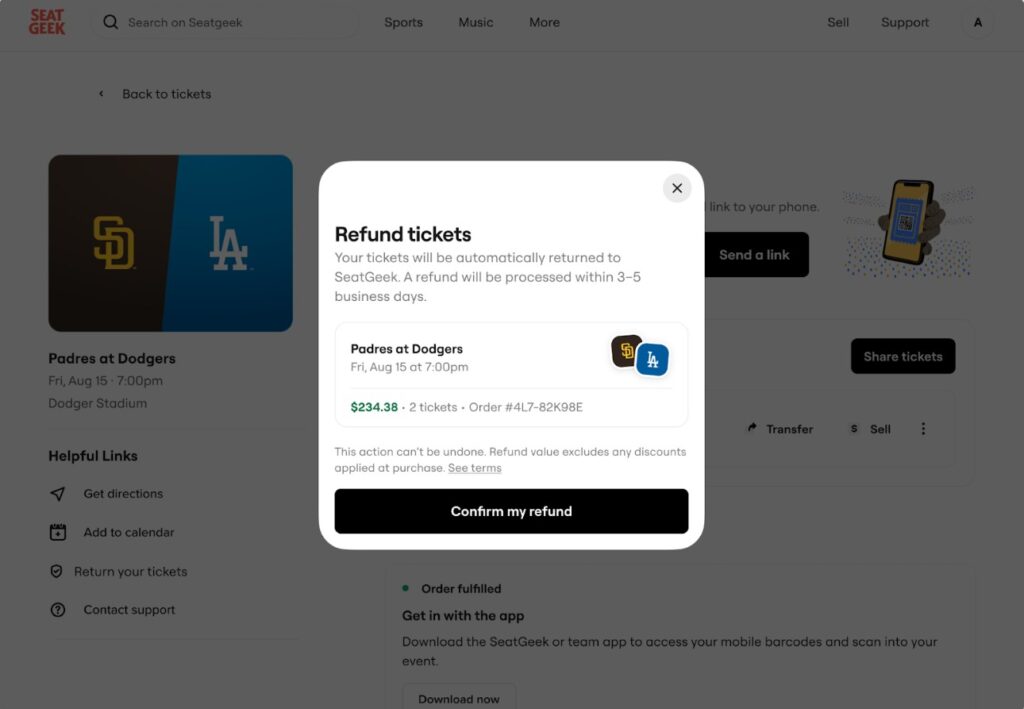
Seatgeek’s returnable tickets feature is a game-changer for anyone who’s ever worried about buying tickets and then not being able to attend. In simple terms, returnable tickets are tickets you can return to Seatgeek for a refund if your plans change, as long as you meet certain conditions. Not all tickets on Seatgeek are returnable, but the ones that are give you extra peace of mind.
This feature is especially helpful because life can be unpredictable. Maybe you bought tickets for a concert months in advance, but now you have a work conflict or an unexpected family event. With returnable tickets, you don’t have to stress about losing your money or trying to resell the tickets yourself.
How Does Seatgeek Returnable Tickets Work?
Here’s a clear outline of how the returnable tickets feature works:
- Identifying Returnable Tickets
When you are browsing tickets on Seatgeek, look for a “Returnable” badge or label on the ticket listing. This badge indicates that the tickets are eligible for Seatgeek’s return policy. Not every event or ticket seller offers returnable tickets, so this feature depends on the event and the seller’s terms.
- Buying Returnable Tickets
The process of buying returnable tickets is the same as buying regular tickets (as described above). You’ll see the “Returnable” label during the ticket selection process, and the checkout process is identical. The price for returnable tickets is sometimes slightly higher because of the added flexibility, but Seatgeek still shows you the full price upfront.
- Returning Your Tickets
If you decide you can’t attend the event, you can return your tickets through Seatgeek, but there are some rules:
- Timeframe: You can return tickets up to 72 hours (3 days) before the event starts. For example, if the event is on Saturday at 7 p.m., you need to request a return by Wednesday at 7 p.m.
- Condition of Tickets: The tickets must be unused and still in your Seatgeek account. If you’ve transferred them to someone else or used them to enter the event, you can’t return them.
- How to Return: Log in to your Seatgeek account, go to your tickets, and select the option to return the tickets. Follow the prompts to confirm the return. Seatgeek will verify that your request meets their policy.
- Getting Your Refund
Once Seatgeek approves your return, you will get a refund for the ticket price, minus any fees that were part of the original purchase. The refund is typically processed to the same payment method you used when buying the tickets. It usually takes a few days for the refund to appear in your account, depending on your bank or card issuer.
- What Happens to the Tickets?
After you return the tickets, Seatgeek takes them back and may resell them to another buyer. This helps ensure the seats don’t go to waste and supports the platform’s goal of making ticket buying and selling fair and flexible.
Important Notes about Returnable Tickets
- Not All Tickets Are Returnable: Only tickets marked with the “Returnable” badge qualify. Always check the listing before buying if this feature is important to you.
- Fees Are Non-Refundable: While you will get a refund for the ticket price, service fees, delivery fees, or other add-ons are usually non-refundable.
- Event Cancellations: If the event is canceled, Seatgeek’s standard refund policy applies, which is separate from the returnable tickets feature. In most cases, you’ll get a full refund (including fees) for canceled events.
- Limited Availability: The returnable tickets feature isn’t available for every event or ticket type, as it depends on the seller and event organizer’s policies.
Why Use Seatgeek for Buying Tickets?
Now that you know how buying tickets and returning tickets work on Seatgeek, let’s talk about why Seatgeek is a great choice for ticket shopping:
- Transparency: Seatgeek shows you the total price, including fees, so you know exactly what you’re paying.
- Deal Score: The color-coded Deal Score helps you find the best value, saving you time and money.
- Wide Selection: Seatgeek aggregates tickets from multiple sources, giving you more options than you might find on other platforms.
- User-Friendly Interface: The app and website are easy to use, with clear seating charts and filters.
- Returnable Tickets: This feature adds flexibility, which is rare in the ticket-buying world.
- Customer Support: If something goes wrong, the support team is there to help via email, chat, or the Seatgeek phone number.
Seatgeek makes buying tickets for your favorite events simple, transparent, and stress free. With their easy to use platform, you can find the best seats, compare prices, and complete your purchase in minutes. The returnable tickets feature adds an extra layer of flexibility, letting you return eligible tickets for a refund if your plans change, provided you do so at least 72 hours before the event.
FAQs
- Are Seatgeek Tickets Legit?
- Yes, Seatgeek is a reputable platform that partners with trusted ticket sellers and event organizers. They also have a Buyer Guarantee, which ensures you get valid tickets or a refund if something goes wrong.
- Why Are Some Tickets Not Returnable?
- Not all sellers or event organizers allow returns, as it depends on their policies. Seatgeek clearly marks which tickets are returnable, so you can make an informed choice.
- Can I Sell My Tickets on Seatgeek?
- Yes, you can sell tickets on Seatgeek if you no longer need them. Just list them through your account, and Seatgeek will handle the rest. Note that this is separate from the returnable tickets feature.