Buying tickets online through Ticketweb is exciting because it takes you one step closer to seeing your favorite band, comedian, or sports team live. That moment of clicking the purchase often comes with a rush of anticipation, but it also comes with something equally important, the Ticketweb confirmation number. This code is more than a random string of digits. It is your proof that the order went through successfully, your way of tracking the booking, and your main reference for solving problems if anything goes wrong.
For many fans, the confirmation number is straightforward. You buy the tickets, receive the confirmation, and soon after you either download or collect them. Yet, not every experience is that smooth. Sometimes people find themselves with a confirmation number but no tickets in their inbox.
Understanding what the confirmation number means, how it works, and how to handle common problems ensures you can enjoy your event without last-minute complications.
What the Ticketweb Confirmation Number Means
Whenever you purchase tickets on Ticketweb, a unique reference code is generated for your order. This is known as the Ticketweb confirmation number. Some users may see variations of the term such as the Ticketweb order confirmation number. Despite sounding repetitive, all of these phrases describe the same thing: the single code tied to your booking.
The importance of this code goes beyond being a receipt. It functions as proof of purchase, showing that your payment was processed correctly. If you need help from Ticketweb customer service, you will almost always be asked to provide this number so they can locate your order in the system.
It also works as a tracking tool, allowing you to verify the status of your tickets, whether they are digital, mobile, mailed, or reserved for pickup at will call. In addition, the confirmation number serves as a layer of security. It links your identity to the specific booking and prevents fraudulent claims from others.
When You Have a Confirmation Number but No Tickets

One of the most common problems Ticketweb customers face is receiving a Ticketweb confirmation number but no tickets. This situation can feel confusing, but it usually has simple explanations.
- Email delays are a leading cause. Although the system generates a confirmation number instantly, the ticket files themselves may take minutes or even hours to arrive, depending on email traffic. It is also common for tickets to be filtered into spam, junk, or promotions folders. Many frustrated customers later find their tickets sitting unnoticed in one of these sections.
- Payment processing can create another delay. Sometimes banks authorize a transaction temporarily, which is enough for Ticketweb to issue a confirmation number, but the full settlement has not yet gone through. In such cases, the tickets may not be released until the funds are confirmed.
- Mobile ticketing adds another layer. For events where entry is digital-only, tickets might not be visible until closer to the event date. This leads some customers to think something went wrong, when in reality, the delay is intentional.
- Technical issues, though less frequent, can also occur. A glitch may generate the confirmation number but fail to attach the ticket PDF or mobile pass. In these instances, Ticketweb support can resend the tickets once the order is identified.
The key point to remember is that if you have the confirmation number, your order exists. The issue is almost always related to delivery timing or format.
How to Retrieve a Lost Confirmation Number?
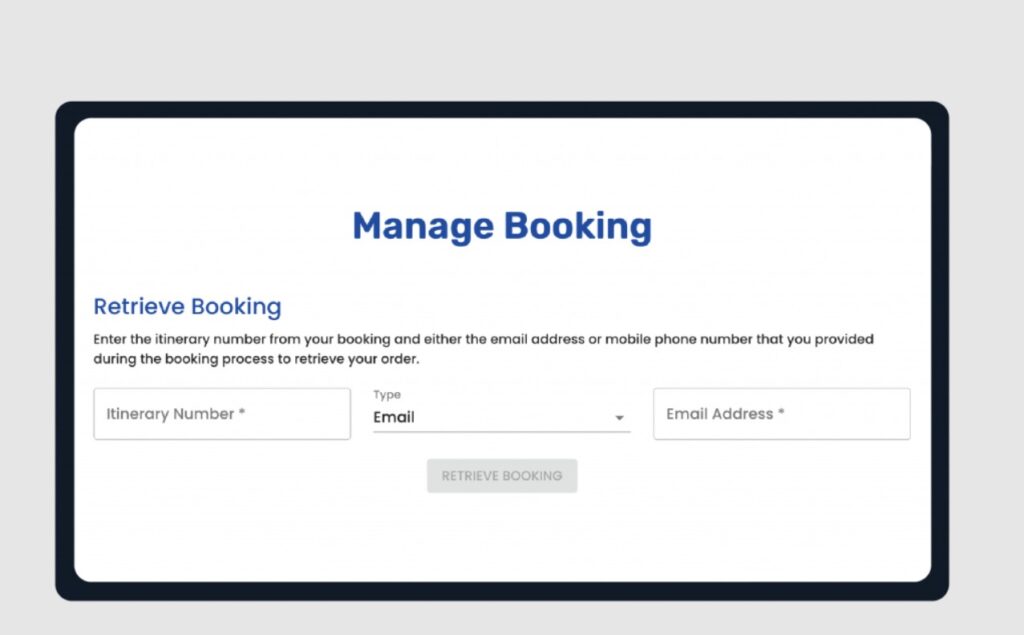
Misplacing the confirmation number is not uncommon. Emails get deleted, accounts get cluttered, and information gets overlooked. Fortunately, several methods exist for retrieving it.
- Start by searching your email inbox thoroughly. Even if you deleted the original message, you might find automated reminders in other folders.
- Logging into your Ticketweb account is another reliable option. The platform stores all past transactions linked to your registered email. Once logged in, you can view your order history and locate confirmation numbers.
- In regions where Ticketweb integrates with mobile apps, you might find your purchases and associated confirmation numbers under the “My Tickets” section. This can be convenient if you often use your phone for entry.
- If none of these methods work, contacting customer support is the last option. By providing details such as your full name, the email used at checkout, and the last four digits of your payment card, support staff can match your purchase and resend the confirmation details.
Common Scenarios Ticketweb Users Face
There are a few recurring situations that highlight the importance of the confirmation number.
- Sometimes customers hold a confirmation number but do not see their tickets right away. The solution usually involves waiting a little longer, checking spam folders, or confirming the delivery method. If the tickets are still missing, Ticketweb allows you to use the confirmation number to request a resend.
- In the case of will call pickup, all you typically need is a valid photo ID, the payment card used during purchase, and the confirmation number. This combination is enough for box office staff to retrieve your tickets.
- If you accidentally delete your ticket email, logging into your account or contacting support with your confirmation number ensures the files are resent quickly.
- When tickets are bought as gifts, sharing the confirmation number along with the ticket files helps recipients resolve issues if they face trouble at the venue. The code acts as proof that the order is valid.
Why You Should Always Save the Confirmation Number
The confirmation number may look insignificant but saving it carefully gives you peace of mind. If your phone is lost or your email is compromised, the confirmation number still serves as evidence of your booking. It helps prevent fraud because Ticketweb uses it to distinguish between genuine buyers and false claims.
A practical tip is to store your confirmation number in more than one location. Save it in your phone’s notes app and also keep a copy in a secure cloud document. This ensures you have access even if one device fails.
Steps to Recover Tickets with the Confirmation Number
If your tickets are missing and you are concerned, following a few steps will usually solve the problem. Start by locating your Ticketweb order number confirmation number through your email or account dashboard. Next, log into your Ticketweb account to check if the tickets are attached to your order. Confirm the delivery method, since mobile tickets may not appear until closer to the event.
If tickets are still unavailable, use the resend option or contact support directly. As a backup, you can visit the event box office with your confirmation number and a valid ID. Staff can retrieve your tickets this way as well.
Wrapping It Up!
The Ticketweb confirmation number is more than a code. It is the guarantee that your purchase is recorded and your place at the event is secure. You might call it a confirmation number, an order confirmation number, or a reference code, but it is the most important detail you receive after payment. How to Transfer Tickets on Ticketweb
If you face the situation of having a confirmation number but no tickets, there is no need to panic. The number confirms your booking exists and gives you multiple ways to retrieve the tickets. By checking your email, logging into your account, or contacting support, you will always have a path to resolution.
FAQs
- I see a pending charge on my credit card but did not receive tickets. What does this mean?
- If you have a confirmation number, the order went through successfully. If you do not have one, the pending charge usually disappears on its own.
- Can I attend an event with only the confirmation number and no ticket file?
- In some cases, such as will call, the confirmation number is enough. Still, having the actual ticket is recommended for smoother entry.
- What happens if I mistyped my email during checkout?
- The confirmation number becomes essential. Ticketweb support can use it along with payment details to correct the email and resend your tickets.
- My event tickets are not available yet. Did I miss something?
Some events release tickets only a week before. The confirmation number guarantees your purchase is valid, even if the barcode is not yet available