When you transfer a ticket, you give someone else the right to attend the event. With Ticketweb, you do this directly from your account, and the ticket goes straight to their email. The process is quick, safe, and keeps your tickets valid and secure. You can send tickets to a friend, family member, or anyone else, and Ticketweb transfer feature makes it simple and reliable for you.
Why You Will Love Using Ticketweb for Transfers
Here’s why using Ticketweb transfer tickets makes things easier for you:
- You don’t need to meet anyone or mail anything. You send your tickets instantly by email.
- Your transfer stays official, so your tickets are verified and valid.
- You share your tickets with anyone you choose, including friends, family, or even a lucky stranger.
- By keeping your transfers on Ticketweb, you protect yourself from shady resellers and fake ticket scams.
With these perks, you can focus on enjoying the event (or passing it on) without stress.
How to Transfer Tickets on Ticketweb
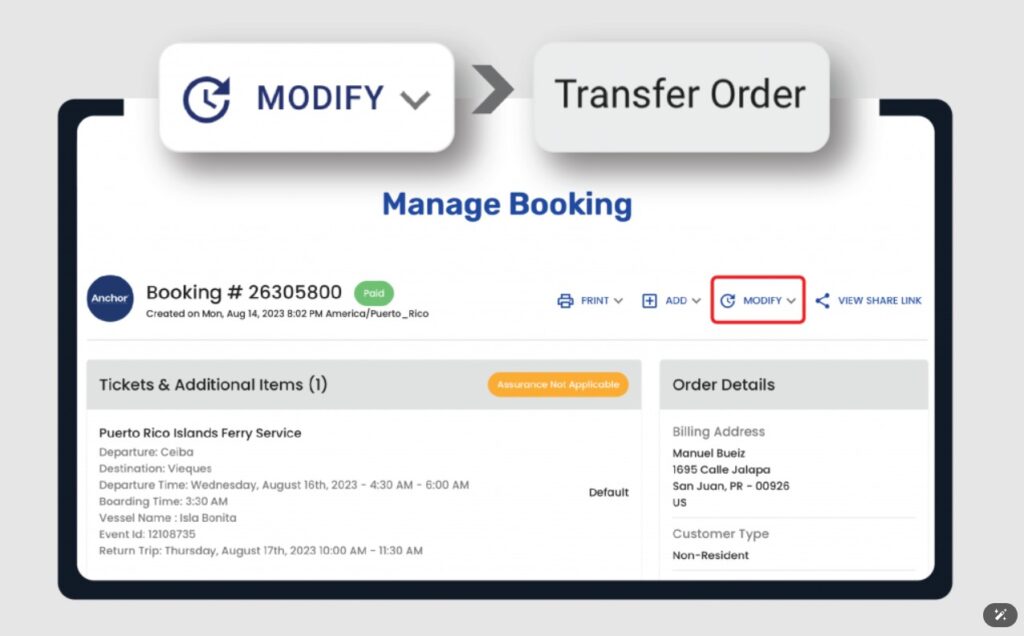
Ready to transfer those tickets? Don’t worry, learning how to transfer Ticketweb tickets is straightforward. Follow these steps, and you will have it done in no time:
-
Log Into Your Ticketweb Account
Head to Ticketweb’s website or app and sign in with the email and password you used to buy your tickets. This gets you access to your ticket stash.
-
Navigate to “My Tickets”
Once you’re in, find the “My Tickets” section. This is your hub for all the tickets tied to your account, neatly organized by event.
-
Select the Ticket to Transfer
Locate the event you’re working with and click on the specific ticket you want to transfer. Most events allow transfers, but it’s smart to double-check the event’s policy to confirm eligibility.
-
Enter the Recipient’s Email
Type in the email address of the person you are sending the ticket to. Double- (and triple-) check it! A typo could send your ticket to the wrong inbox.
-
Confirm the Transfer
Hit the confirm button, and Ticketweb will handle the rest, processing the transfer in moments.
-
Look for Confirmation
You will get an email letting you know the transfer went through successfully. Check your inbox (and maybe your spam folder) to be sure.
-
Recipient Gets Their Ticket
Your recipient will receive an email from Ticketweb with their shiny new ticket, ready to scan at the event’s entrance.
That’s it! You have just made someone’s day without any hassle.
Key Details You Need to Know
Before you start a Ticketweb transfer, here are some important points to keep in mind:
- Event Policies Vary: Some event organizers restrict transfers for security, fraud prevention, or logistical reasons. Always check the transfer policy in the “My Tickets” section before you start.
- Not All Tickets Are Transferable: Certain tickets, like those bought under special promotions or conditions, might be locked to the original buyer. For example, name changes after purchase are typically not allowed.
- Multiple Transfers Are Often Okay: Many events let you transfer a ticket more than once. If your recipient can’t use it, you might be able to reclaim and reassign it, as long as the event allows.
Understanding these nuances ensures you are prepared for any situation.
Guest Checkout vs. Account Holder
Ticketweb lets you buy tickets as a guest or with an account. Each has its pros and cons, especially when it comes to transfers.
-
Buying as a Guest
Guest checkout works well if you are buying tickets for a single event and want a fast, simple process. Your tickets arrive by email, and you’re good to go. The limitation is that without an account, you don’t get access to the “My Tickets” section, so official transfers through Ticketweb’s platform are not available.
People often ask how to transfer tickets on Ticketweb without an account, but the only option is forwarding the email, which is risky for events with secure barcodes or mobile-only tickets. If you expect to transfer tickets later, creating an account during purchase is the smarter option.
-
Benefits of an Account
Creating a Ticketweb account unlocks a ton of flexibility, especially when it comes to how to transfer tickets on Ticketweb:
- Full Ticket Management: Track all your tickets in “My Tickets.”
- Easy Transfers: Send tickets to anyone with a few clicks.
- Event Updates: Get notifications via email and the app.
- Resale Options: If allowed, sell tickets securely through Ticketweb’s platform.
- Streamlined Refunds: Handle refunds or issues directly through your account.
In short, an account makes your life easier, especially if plans change.
Best Practices for Ticket Transfers
Want to nail your ticket transfers? Here are some insider tips to keep things smooth:
-
Check Transfer Eligibility Before Buying
Some events, like high-security concerts or festivals, block transfers to prevent scalping or fraud. Check the event’s policy when you buy to avoid surprises.
-
Double-Check the Recipient’s Email
A small typo could send your ticket to the wrong person. Verify the email address before confirming the transfer.
-
Keep an Eye on Your Inbox
After transferring, watch for a confirmation email from Ticketweb. Tell your recipient to check their email (including spam or promotions folders) for the ticket.
-
Explore Resale Options
If you can’t attend and transfers aren’t allowed, Ticketweb’s resale platform (if available for the event) lets you sell tickets securely, ensuring buyers get valid tickets.
-
Contact Customer Support When Needed
Run into issues? Ticketweb customer service can help with lost tickets, transfer glitches, or other problems. Reach out through their help center for quick assistance.
-
Transfer Early
Don’t wait until the last minute. Handle transfers well before the event to avoid stress or technical hiccups.
-
Inform Your Recipient
Let the person receiving the ticket know to expect an email from Ticketweb. A heads-up ensures they don’t miss it in their inbox.
Guest vs. Account Holder: A Side-by-Side Comparison
Here’s a quick comparison of guest checkout versus having a Ticketweb account:
| Feature | Guest Buyer | Account Holder |
| Ticket Purchase | Quick and easy | Quick and easy |
| Ticket Tracking | Email only | Full history in “My Tickets” |
| Ticket Transfers | Not available | Available via “My Tickets” |
| Event Updates | Email only | Email and in-app notifications |
| Refunds | Contact support | Streamlined via account |
| Resale | Limited (event-dependent) | Full access if event allows |
Guest checkout is great for simplicity, but an account gives you way more control and flexibility.
Wrapping It Up: Be a Ticket Transfer Pro
Ticketweb’s transfer system makes changing your plans simple and secure. You can pass tickets to a friend or resell them safely using easy-to-use tools. By creating an account, reviewing event policies, and following the right steps, you stay in control of your tickets. When you purchase through Ticketweb, go to the “My Tickets” section, learn the Ticketweb transfer process, and manage everything with confidence. Enjoy your events in 2025 with smooth and hassle-free transfers.
FAQs
- Can you transfer Ticketweb tickets?
- Log in to your account, open “My Tickets,” choose the ticket, enter the recipient’s email, and confirm. Some events may have restrictions set by the organizer.
- How do you transfer tickets?
- Log in, go to “My Tickets,” select the ticket, add the recipient’s email, and confirm. The ticket is delivered to them by email.
- What if you bought tickets without an account?
- Guest checkout sends tickets to your email, but you don’t get access to the “My Tickets” portal for official transfers. Forwarding the ticket email or PDF might work, but it’s not always reliable for events with secure barcodes. Review the event policy and consider creating an account for easier transfers in the future.
- Do recipients need a Ticketweb account?
- They can receive and use the ticket without one. If they want to manage or transfer tickets again, having a Ticketweb account gives them full control.
Recommended Post:
TicketWeb Refund Policy
How to Find Your Ticketweb Order Number
Is Ticketweb the Same as Ticketmaster
How Does Ticketweb Tickets Work
How to Use Ticketweb Presale Code to Get Tickets
How to Sell Your Tickets on TicketWeb