
You finally get tickets to a concert you have been looking forward to. After checking out, you look at your email expecting a file or something to print. Instead, you find a message asking you to open the Ticketmaster app. There is no attachment, no PDF, and nothing to download. How Virtual Ticketmaster Tickets Work
If this seems confusing at first, you are not alone. This is the new normal. The events industry has mostly shifted away from paper tickets. Virtual Ticketmaster tickets have become the standard for entering concerts, sports games, and live shows.
This complete guide explains exactly how virtual Ticketmaster tickets work — the technology behind them, how to access them, how to transfer them, and how to fix every common issue before you reach the gate. By the end, you will feel fully confident using Ticketmaster mobile tickets at any event.
Key Stats:
- 560M+:Annual tickets processed by Ticketmaster
- 95%:Major events now using mobile-only entry
- ~30s:SafeTix barcode refresh interval
- 0%:Chance a screenshot barcode works
What Are Virtual Ticketmaster Tickets?
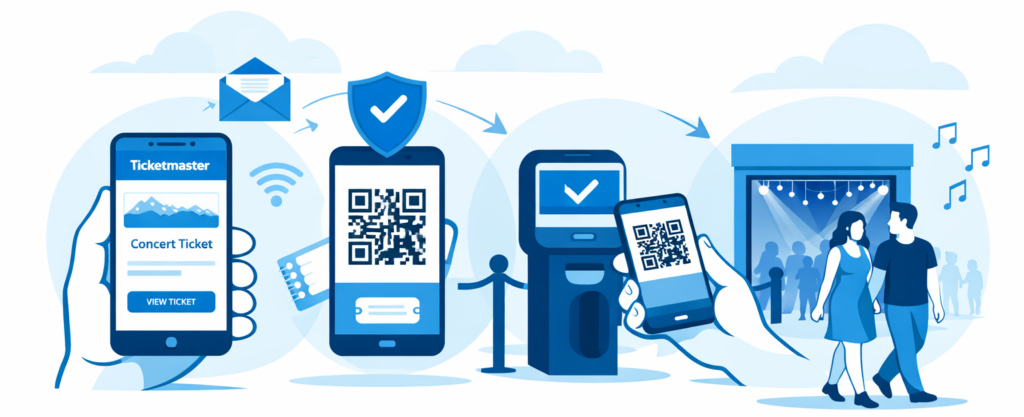
Virtual Ticketmaster tickets are fully digital event credentials stored in your Ticketmaster account and accessed via the Ticketmaster app or mobile browser. They replace physical paper tickets entirely, using encrypted barcodes, NFC signals, or QR codes to verify entry at the gate.
The term “virtual ticket” broadly covers three distinct formats on the Ticketmaster platform:
|
Format |
How It Works |
Print supported |
Security Level |
| SafeTix Mobile Ticket Most Common | Rotating encrypted barcode in the Ticketmaster app | No | Highest |
| E-Ticket (PDF) Legacy | Static barcode sent via email as a PDF | Yes | Medium |
| Standard Mobile Ticket Common | QR code displayed in-app or mobile browser | No | High |
Understanding which format applies to your event matters — especially for events using SafeTix, where the app is the only valid entry method.
How Virtual Ticketmaster Tickets Work (Step-by-Step)
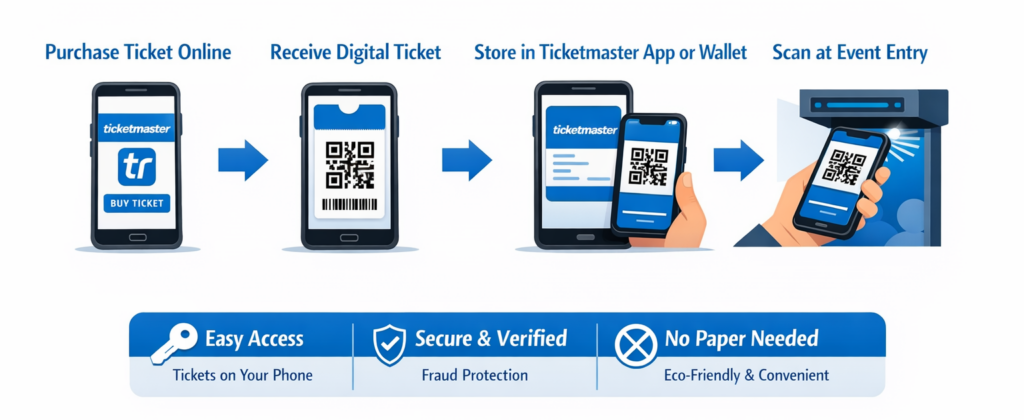
The process from purchase to venue entry follows a clear, logical chain. Here is every stage explained:
- Purchase Your Tickets: Complete your order on Ticketmaster.com or the app. Your tickets attach instantly to your Ticketmaster account linked to your email address.
- Receive Your Confirmation Email: Ticketmaster sends an order confirmation email. For digital tickets Ticketmaster designates as SafeTix, this email does not contain the ticket itself — it contains a link directing you to the app.
- Open the Ticketmaster App: Download the official Ticketmaster app (iOS or Android). Log in with the account you used to buy. Navigate to “My Tickets” — your event should appear there.
- Access Your Ticket on Event Day: Open your event in the app, tap the ticket, and a barcode displays on screen. For SafeTix events, this barcode rotates automatically every 20–30 seconds.
- Scan at the Venue Gate: Hold your phone screen facing the scanner. The device reads the barcode or NFC chip, verifies its authenticity in real time, and grants access. The process takes under two seconds.
Pro tip: Open your ticket in the app before you reach the queue. Fumbling with loading screens in a crowd slows everyone down and adds stress you do not need.
Understanding Ticketmaster SafeTix
SafeTix is Ticketmaster’s proprietary anti-fraud technology, and it fundamentally changes how Ticketmaster app tickets operate at the gate.
1. How the Rotating Barcode Works
Every SafeTix barcode contains an encrypted token tied to your specific account, device, and seat. The barcode refreshes every 20–30 seconds, generating a new cryptographic code each time. The venue’s scanner communicates with Ticketmaster’s servers to validate the current token in real time.
This means that even if someone photographed your barcode one second ago, their screenshot carries an expired code. By the time they reach the gate, the scanner rejects it.
2. Anti-Screenshot Protection
SafeTix actively blocks screenshots on most devices. When you try to capture the screen displaying a SafeTix barcode, the ticket area renders as a blank or darkened region. This design prevents opportunistic fraud where someone screenshots a ticket and claims entry before the original buyer.
3. NFC Functionality
For NFC-enabled venues, your phone communicates wirelessly with the gate reader without even requiring you to display a barcode. You tap or wave your phone near the scanner, and the encrypted handshake grants entry — just like contactless payment.
Why Safetix Matters
Before rotating barcodes, ticket fraud cost U.S. consumers hundreds of millions of dollars annually through screenshot scams and duplicated PDFs. SafeTix effectively eliminates the most common fraud vectors by making every ticket cryptographically unique to the present moment. Ticketmaster phone number customer service
How to Access Your Ticketmaster Mobile Tickets
1. Via the Ticketmaster App (Recommended)
- Download the Ticketmaster app from the App Store or Google Play
- Sign in with your purchase account credentials
- Tap the menu icon and select “My Tickets”
- Select your upcoming event and tap “View Barcode”
- The rotating barcode appears — keep the screen bright
2. Via Mobile Browser
If you prefer not to install the app, navigate to ticketmaster.com in your phone’s browser, log in, and visit “My Tickets.” Most non-SafeTix events display a QR code directly in the browser. SafeTix events, however, require the native app because rotating barcodes need local encryption support the browser cannot provide.
3. Offline Access Tips
SafeTix barcodes require an active internet connection for real-time validation. Here are practical steps to prepare for poor signal zones:
- Open your ticket on the app before entering the venue’s WiFi dead zone
- Enable Airplane Mode briefly after loading — the barcode may remain visible
- Download the app ahead of time, not in the parking lot queue
- Enable Ticketmaster’s offline mode if available for your event
Transferring and Reselling Virtual Tickets
How Ticket Transfer Works
Transferring a Ticketmaster mobile ticket to a friend is straightforward. Open the app, navigate to the event, select the ticket you want to transfer, and tap “Transfer Tickets.” Enter the recipient’s email address or Ticketmaster username. Once they accept, the ticket moves to their account and disappears from yours.
Important: Once transferred, you lose all access to that ticket. Do not transfer tickets to strangers claiming a “better price” — this is a known scam tactic.
Selling Tickets via Ticketmaster Fan-to-Fan
You can list tickets for resale directly through Ticketmaster’s official resale marketplace. The platform handles the transaction, and buyers receive authentic tickets through the same secure system. You receive payment after the event takes place.
Restrictions and Limitations
- Some artists and venues restrict or disable ticket transfers entirely
- Transfer windows may close 24–48 hours before an event
- Tickets purchased with fan-club presale codes may be non-transferable
- Platinum and VIP tickets often carry additional transfer restrictions
Benefits of Virtual Ticketmaster Tickets
1. Convenience
Digital tickets eliminate the risk of losing, forgetting, or damaging a paper stub. Your phone holds every ticket you own. You can access them instantly from anywhere, and last-minute purchases arrive in your account within seconds of checkout.
2. Security
SafeTix’s rotating barcode system makes ticket fraud exponentially harder. Each barcode is single-use, time-stamped, and account-specific — a combination that static paper tickets can never replicate.
3. Eco-Friendly Advantages
Eliminating paper tickets and physical will-call infrastructure saves millions of sheets of paper annually across Ticketmaster’s global events. For fans who care about environmental impact, digital ticketing reduces waste throughout the entire event supply chain.
4. Reduced Fraud Risks
Common scams — including duplicate PDF tickets sold twice, fake barcodes printed at home, and Craigslist screenshot fraud — all become irrelevant in a SafeTix environment. The technology makes counterfeit tickets functionally useless.
Common Issues and Fixes
1. Ticket Not Showing in the App
- Confirm you are logged into the correct Ticketmaster account (the one used at purchase)
- Pull down to refresh the “My Tickets” screen
- Log out fully, clear the app cache, and log back in
- Check your order confirmation email for the exact email address used
- Contact Ticketmaster Fan Support with your order number if the issue persists
2. Barcode Not Loading or Spinning Indefinitely
- Connect to a stable WiFi network and retry
- Force-close the app and reopen it
- Update the Ticketmaster app to the latest version
- Delete and reinstall the app as a last resort
3. App Crashes at the Gate
This scenario causes real anxiety, but venues handle it routinely. Show your order confirmation email to a gate agent. They can manually look up your booking by order number and name, then verify entry through their system.
4. Phone Runs Out of Battery
Approach the box office immediately. Staff can pull up your booking using your order confirmation number and a photo ID. Most major venues expect this scenario and have a clear process for handling it.
5. Venue WiFi Overload
Large venues with tens of thousands of attendees often experience mobile network congestion. Open your ticket on the app before you enter the venue grounds. The barcode may remain accessible even with limited connectivity once loaded.
Tips for Smooth Entry at Events
- Arrive 30 Minutes Early: Mobile ticket scanning at major venues can slow queues significantly. Arriving early avoids the bottleneck created by crowds all pulling out phones at the same time.
- Charge Your Phone Before Leaving Home: Aim for at least 80% battery. Bring a portable power bank if your phone has a history of battery drain, especially in cold weather, which accelerates battery depletion.
- Never rely on a Screenshot: SafeTix barcodes rendered in screenshots are dead on arrival. Always use the live barcode displayed in the official Ticketmaster app.
- Increase Screen Brightness: Scanners struggle to read barcodes on dim screens. Disable auto-brightness and set your screen to maximum before joining the gate queue.
- Remove Screen Protectors If Scanning Fails: Certain matte or privacy screen protectors interfere with barcode scanners. Remove them temporarily if the gate agent has difficulty reading your ticket.
Are Virtual Ticketmaster Tickets Safe and Reliable?
The short answer: yes, and they are significantly more secure than paper alternatives.
Ticketmaster encrypts ticket data at every stage — from purchase to delivery to gate validation. SafeTix barcodes communicate over HTTPS with Ticketmaster’s servers and use rolling cryptographic tokens that make replay attacks impossible. Even if a bad actor intercepted the barcode data, the token would expire in seconds.
Venues increasingly mandate mobile-only entry precisely because it gives them complete control over the ticketing chain. Every scan creates a real-time audit log, enabling venues to detect duplicate use attempts instantly. Fraudulent ticket resale — a billion-dollar problem in the paper era — drops dramatically with SafeTix deployed at the gate.
The main risk to digital tickets is not fraud — it is user error. Logging into the wrong account, failing to update the app, or running out of battery creates the overwhelming majority of gate-entry problems fans experience.
Do Ticketmaster Tickets Work Without Internet?
In most cases, you need an internet connection to load your ticket, especially for SafeTix events. The barcode updates in real time, which requires connectivity.
However, you can reduce risk by:
- Opening your ticket before reaching the venue
- Keeping the ticket screen active
- Using offline mode if supported
Once loaded, the ticket may remain visible for a short time even with weak signal—but do not rely on this completely.
Can Ticketmaster Tickets Be Printed?
Most modern Ticketmaster tickets cannot be printed.
- SafeTix tickets use rotating barcodes that only work in the app
- Screenshots and printed copies do not scan
- PDF tickets are now limited to select events
Always check your ticket type in advance. If your event uses SafeTix, your phone becomes your only valid entry method.
Parting Advice
Virtual Ticketmaster tickets represent a fundamental upgrade in the event-going experience. From SafeTix’s rotating barcodes to seamless mobile transfers, the system prioritizes security, speed, and convenience at every step.
The core rules to remember: always use the official Ticketmaster app, never rely on screenshots, keep your phone charged, and arrive early enough to avoid gate-queue stress. When you follow these steps, digital tickets Ticketmaster-style deliver a faster and more secure entry than any paper stub ever could.
If you experience any technical issues — tickets not appearing, barcodes failing to load, or app crashes — the troubleshooting steps above resolve the vast majority of problems. For anything beyond that, Ticketmaster Fan Support can assist with your order number on hand.
Now you know exactly how virtual Ticketmaster tickets work. Go enjoy the show.
Frequently Asked Questions
1. Can I print my virtual Ticketmaster tickets?
For most major events, no — printing is no longer supported. SafeTix tickets use a rotating barcode that only functions in the live Ticketmaster app. Some legacy events still offer PDF e-tickets, but this format is increasingly rare. Always check your order confirmation to see which ticket format applies to your event.
2. What happens if my phone dies at the venue?
Head directly to the venue’s box office. Bring your order confirmation email (you may have it cached) and a valid government-issued photo ID. Staff can manually locate your booking using your order number and name, then grant entry. To avoid this situation, charge your phone fully before leaving and carry a portable power bank.
3. Can I share my Ticketmaster mobile tickets with someone else?
Yes, you can transfer tickets to another person through the Ticketmaster app or website. Select the ticket, choose “Transfer,” and enter the recipient’s email. They need a free Ticketmaster account to accept. Note that some events disable transfers, and transfer windows often close 24–48 hours before the event. You cannot transfer tickets by sharing a screenshot — that barcode will not work for the recipient.
4. Do screenshots of Ticketmaster barcodes work at the gate?
No. SafeTix barcodes rotate every 20–30 seconds, so any screenshot is already expired by the time you reach the scanner. The gate system will reject it immediately. SafeTix also actively blocks the screenshot function on most devices. Always use the live barcode displayed in the official Ticketmaster app.
5. How early do virtual Ticketmaster tickets become available in the app?
Tickets typically appear in your Ticketmaster account immediately after purchase. However, some venues and artists delay ticket release until 24–72 hours before the event for security reasons. If your tickets are missing, check the order confirmation email for a “ticket release” date before contacting support.
6. Do I need the Ticketmaster app or can I use a browser?
For standard QR code tickets, a mobile browser works. For SafeTix events, the official Ticketmaster app is mandatory — the rotating encrypted barcode requires app-level functionality that browsers cannot support. Installing the app before your event is strongly recommended regardless of ticket type.
7. Can multiple people use one phone to enter?
Yes — if you purchased multiple tickets in one order, all tickets appear in your Ticketmaster account. At the gate, swipe through each ticket barcode for every person in your group. The gate agent scans each one individually. Alternatively, transfer individual tickets to each person’s own account so everyone can enter independently.
Recommended Ticketmaster Post:
How to Sell Tickets on Ticketmaster
How much does Ticketmaster charge to sell tickets
Transfer tickets from ticketmaster to stubhub
How to get a refund on ticketmaster tickets
How to transfer tickets on ticketmaster
Ticketmaster how to verify phone number
Ticketmaster app not working
500 internal server error ticketmaster
Ticketmaster error code 5005