Ticketweb is an online ticketing platform that makes it easy for fans to buy tickets for live events, such as music concerts, comedy shows, and festivals. If you are wondering how does Ticketweb work, it operates as a division of Ticketmaster and focuses on helping fans connect with events at independent venues and smaller promoters.
The platform is designed to be user-friendly. Allowing fans to discover events, purchase tickets, and even resell tickets for certain events. It also provides tools for event organizers and venues to manage ticket sales, promote events, and connect with fans.
How Does Ticketweb Tickets Work?

The platform operates as a middleman between event providers (like venues, promoters, or artists) and fans. If you are asking how does Ticketweb tickets work, here’s a step-by-step look at how Ticketweb works.
For Ticket Buyers
- Finding Events:
Start by visiting the Ticketweb website. You can browse events by category, such as music, comedy, or festivals, or search for specific events by name, date, or location.
- Selecting Tickets:
Once you find an event, click on it to see details like the date, time, venue, and ticket prices. You can view seating charts (if applicable) to pick your preferred seats or check if the event is general admission (standing or open seating). Ticketweb shows you the ticket price, plus any service fees, so you know the total cost upfront.
- Purchasing Tickets:
To buy tickets, you will need a Ticketweb account. If you don’t have one, you can create one with your email and a password. After selecting your tickets, you will enter your payment information (credit card, debit card, or other accepted methods).
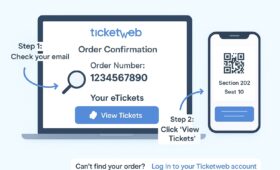
Once the purchase is complete, you will receive a confirmation email with your order details and a confirmation number.
- Accessing Tickets:
After buying, your tickets are stored in your Ticketweb account under the “My Tickets” section. You can also find them in the confirmation email, which includes a link to view or download your tickets.
If you can’t find your tickets, Ticketweb’s “Find My Ticket” tool lets you retrieve them by entering your email and the last four digits of your payment card.
- Attending the Event:
On the event day, you will present your tickets at the venue. Tickets can be delivered in different ways, such as e-tickets (PDFs you print or show on your phone), will-call (pick up at the venue with ID), or physical tickets (mailed to you, depending on the event). Most events use e-tickets for convenience, which we’ll cover in more detail later.
For Event Organizers and Venues
Ticketweb is a self-service platform for event organizers, venues, and promoters. It provides tools to create, market, and manage events. Here’s how it works for them:
- Event Creation
Organizers log into the Ticketweb system with a secure account to set up their event. They can specify details like ticket prices, seating arrangements, and whether the event allows resale. The platform supports general admission, reserved seating, and multi-area events.
- Marketing Tools
Ticketweb helps promoters reach more fans by listing events on its website, Ticketmaster, and partner sites like Bandsintown and Facebook. Organizers can also use tools to create email campaigns, offer discounts, or promote related events (cross-sells) to boost ticket sales.
- Ticket Sales
Tickets are sold through multiple channels, including online, phone centers, and box offices. All sharing the same inventory to prevent overselling. Organizers can use Ticketweb’s mobile box office app, CheckIn, to sell tickets at the door and accept payments via cash, credit cards, or mobile payments like Apple Pay. How to Contact TicketWeb Customer Service by Phone
- Reporting and Data
Ticketweb provides real-time reports on sales, attendance, and customer data, helping organizers track performance and plan future events. Reports can be downloaded in formats like CSV or Excel for easy analysis.
For Ticket Sellers
If you have tickets you can’t use, Ticketweb allows you to resell them for certain events.
How Do Ticketweb Tickets Work?
Buying tickets on Ticketweb is straightforward, but understanding the process can help ensure a smooth experience. Here’s a closer look at how tickets work on the platform.
Ticket Types
Ticketweb offers different types of tickets depending on the event and venue:
- E-Tickets: These are digital tickets delivered as PDFs via email or stored in your Ticketweb account. You can print them or show them on your phone at the venue. E-tickets are the most common delivery method.
- Will-Call: For some events, tickets are held at the venue’s box office. You pick them up on the event day by showing your ID and confirmation number.
- Physical Tickets: In rare cases, tickets may be mailed to you. But this depends on the event and how far in advance you purchase.
Ticket Purchase Process
When you buy a ticket, Ticketweb acts as the agent for the event provider (the venue, promoter, or artist). They handle the transaction and collect payment on behalf of the provider. Here’s what happens:
- Choose Your Event: Browse or search for your event on the Ticketweb website or app.
- Select Seats or Admission Type: Pick your seats (for reserved seating events) or choose general admission tickets. Note that general admission tickets may have a row and seat number for system purposes, but they don’t always indicate a specific spot.
- Pay Securely: Enter your payment details. Ticketweb verifies your billing address and card information to prevent fraud. If there is an issue, their customer service team may contact you to confirm details. If they can’t reach you, your order could be canceled to prevent unauthorized purchases.
- Receive Confirmation: After payment, you’ll get a confirmation email with your order details and a link to access your tickets.
Ticket Delivery and Entry
Once purchased, tickets are delivered based on the event’s settings. E-tickets are sent as PDFs or QR codes, which venues scan at entry. For will-call, you will need to bring your ID and confirmation number to the venue.
Refunds and Policies
Ticketweb’s refund policy is strict. Refunds are only available if an event is canceled or rescheduled, or if there was an error in pricing or overcharging. You can’t get a refund for reasons like changing your mind, scheduling conflicts, or performer changes. If eligible, refunds are processed to the original payment method and may take up to two weeks.
How Does Ticketweb Work for Sellers?
If you can’t attend an event, you may be able to sell your tickets through Ticketweb’s resale feature, but not all events allow this. Here’s how selling tickets on Ticketweb works. How to Use Ticketweb Presale Code to Get Tickets
Checking Resale Eligibility
Before listing your tickets, check the event page or terms and conditions to confirm if resale is allowed. Some events restrict resale to prevent scalping or ensure fair pricing.
Steps to Sell Tickets on Ticketweb
- Log Into Your Account: Go to Ticketweb.com and sign into your account where the tickets were purchased.
- Access “My Tickets”: Find the event in the “My Tickets” section of your account.
- Select Tickets to Sell: Click the “Sell” button next to the event. Choose which tickets you want to sell (you can sell some or all of them).
- Set Your Price: Decide how much to charge. Some events require you to sell at face value or below to keep prices fair. Ticketweb shows the original face value during listing, so buyers know what they’re paying.
- Confirm Listing: Review your listing details and agree to Ticketweb’s terms. A service fee will be deducted from the sale price when the tickets sell.
- Transfer Tickets: Once a buyer purchases your tickets, you’ll need to transfer them. This can be done electronically through Ticketweb (for e-tickets) or in person, depending on the event. Ticketweb notifies you via email when a sale is made.
- Get Paid: Payments are sent via PayPal or direct deposit, based on your preference. You will need a U.S. bank account to sell tickets for U.S. events, and you may need to provide tax details (like an SSN or ITIN) for verification.
How Does Selling on Ticketweb Work?
Selling on Ticketweb is designed to be safe and straightforward, and if you are wondering how does selling on Ticketweb work. There are a few things to keep in mind: How to Sell Your Tickets on TicketWeb
- Fraud Protection: Ticketweb verifies tickets to ensure they’re authentic, reducing the risk of scams. Payments are held until the buyer receives the tickets, ensuring sellers get paid securely.
- Service Fees: When your tickets sell, Ticketweb charges a service fee, which is a percentage of the sale price. This covers the cost of processing the transaction and maintaining the platform.
- Resale Restrictions: Not all events allow resale, so always check the event details. If resale isn’t allowed. You may be able to transfer tickets to a friend or family member instead.
- Will-Call Transfers: For will-call tickets, you can contact the venue to change the pickup name to the buyer’s name. However, there’s no guarantee the original buyer can’t change it back, so use trusted platforms for safety.
How Does Selling Tickets on Ticketweb Work?
Selling tickets involves listing them on Ticketweb’s platform and transferring them to the buyer. If you are wondering how does selling tickets on Ticketweb work, here’s a quick look:
- Log into your Ticketweb account and go to “My Tickets.”
- Select the event and click “Sell.”
- Choose the tickets, set a price, and confirm the listing.
- Wait for a buyer. You’ll get an email when the tickets sell.
- Transfer the tickets electronically or in person, as specified.
- Receive payment via PayPal or direct deposit.
To avoid scams, always use Ticketweb’s official resale system. Avoid sharing PDFs directly with buyers. As they could be copied and sold multiple times, leading to invalid tickets at the venue.
How Does Ticketweb E Tickets Work?
E-tickets are the most common way to receive and use tickets on Ticketweb. If you are wondering how does Ticketweb e tickets work? They are digital tickets delivered as PDFs or QR codes. Making them easy to manage and use. Here’s how they work:
-
Receiving E-Tickets
- After purchasing, you will receive an email with your e-tickets as a PDF attachment or a link to download them. You can also find them in your Ticketweb account under “My Tickets.” If you don’t see the email, check your spam folder or use the “Find My Ticket” tool.
-
Using E-Tickets
At the Venue: Show the e-ticket on your phone or print it out. The venue scans the QR code or barcode to verify it. Each code is unique and can only be scanned once, preventing duplicates.
- Transferring E-Tickets: If you want to give your tickets to someone else. You can forward the PDF or transfer them through your Ticketweb account. Log in, go to “My Tickets,” select the event, and enter the recipient’s email to send the tickets securely.
- Reselling E-Tickets: For resale, follow the steps outlined above. E-tickets are transferred electronically to the buyer after the sale, ensuring a secure process.
-
Benefits of E-Tickets
- Convenience: No need to wait for mailed tickets or visit the venue early for will-call.
- Security: E-tickets are verified by Ticketweb, reducing the risk of fraud.
- Flexibility: Easily transfer or resell e-tickets through the platform.
Wrapping It Up
Ticketweb is a user-friendly platform that makes it easy to buy, sell, and manage tickets for live events. No matter if you are a fan looking for your next concert, or someone needing to resell tickets, Ticketweb offers tools to simplify the process. Its e-ticket system is secure and convenient, letting you access tickets on your phone or computer with ease.